Microsoft 365 License & Progressive Web Apps (PWA)
Microsoft has discontinued the not-for-profit licenses for their Microsoft 365 products globally. This change would have seen the cost of Scouts SA's license increase substantially. As a result, Scouts SA migrated to Scouts Australia's education license as an eligible organisation.
Under Office 365 A1 license that have been provided to volunteers you will have access to Microsoft 365 mobile apps including Outlook and Teams. You can read more about this through the weblink below.

Compare Microsoft 365 Education Plans | Microsoft Education
This volunteer M365 license, however, will not allow you to download desktop apps. If you have your personal subscription for M365 you will be able to add your scout email to the existing subscription.
Alternatively, you also can follow below steps to pin the web version of your Outlook to taskbar which will work as an App to access all your emails in one place.
1. Login to your account through https://outlook.office.com/ using your credentials
Username: yourmembernumber@team.sa.scouts.com.au
Password: Your new password
2. Click on the top right corner icon (as shown below) which says 'App available. Install Outlook'
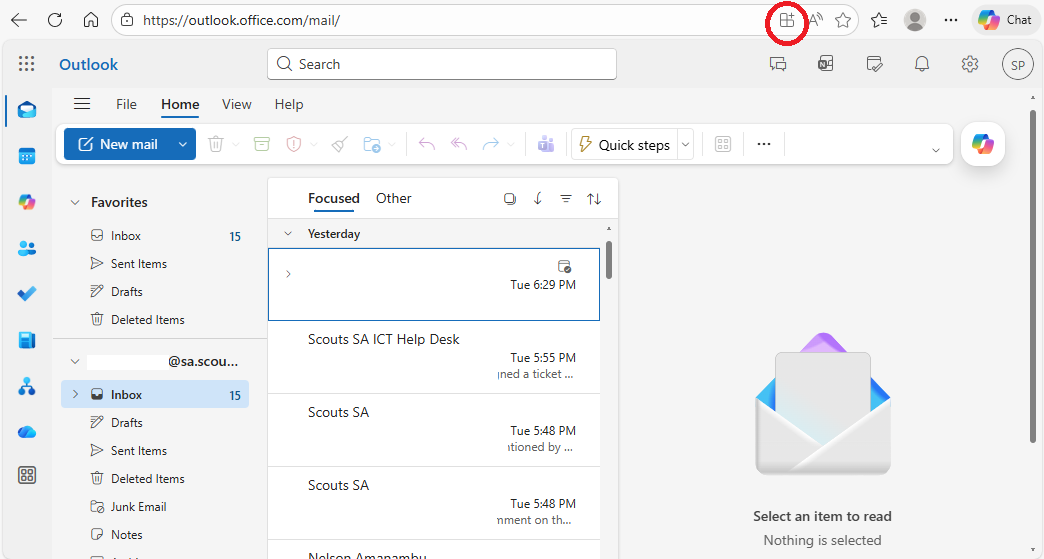
3. Click 'install' in the pop up box
4. Click 'Allow' for 'Pin to taskbar' & 'Pin to Start'
You are all set!

If you are trying to add a shared mailbox please visit https://scoutssa.zohodesk.com.au/portal/en/kb/articles/adding-shared-mailbox-in-outlook-web-app-new