How to Send Profile Updates in Bulk
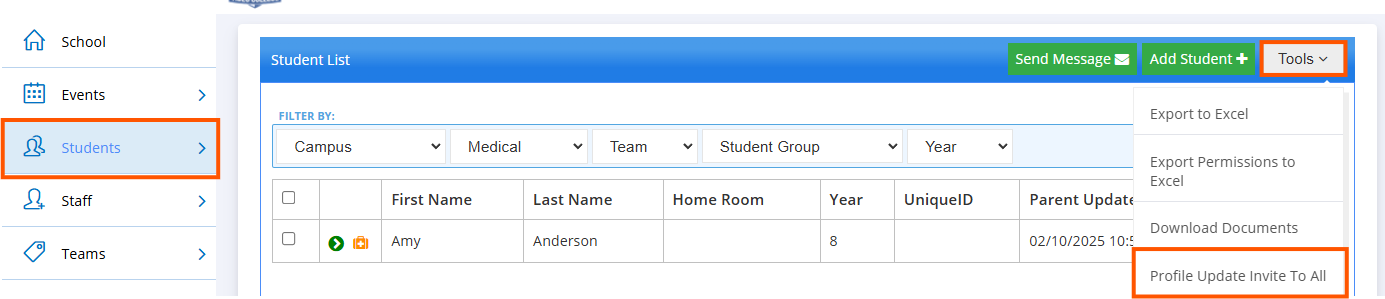
To send profile updates in bulk, navigate to the ‘Students’ tab. Once there, click on the ‘Tools’ dropdown box to the top right of the screen. Then select ‘Profile update to all’.
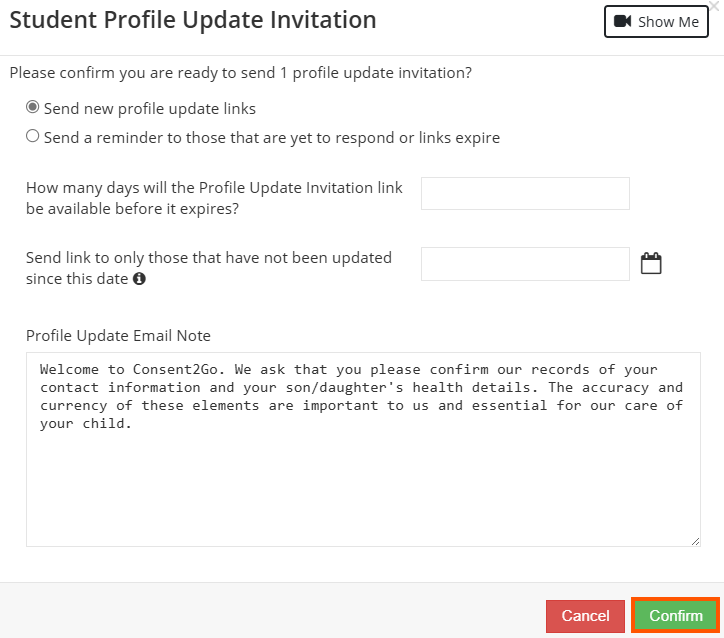
A pop-up will display, asking you to choose how long you would like the links to remain open, select if this should be sent to all students or just those that have not yet responded, and outline the email note to accompany the update.
Once these details have been provided, select "Confirm" to send this to families.
Related Articles
How to Send Profile Updates to Individual Students
To send profile updates to individual students, find the student through the ‘Students’ tab, then click the ‘actions’ bar at the right of the screen. From the drop-down box, select ‘Profile Update Invitation’. The pop-up display for this option, ...Profile Update Process
Introduction Profile updates are sent by Scouts, and allow you to provide your child's most up to date information directly to their Scout Group. Through profile updates, you can do the following: Add or update your personal information Add or update ...I am a parent. How do I access Consent2Go?
Your Scout Group will send an invitation to the email address they have on file for you. Clicking the link in the email will take you to your child’s profile, where you can review and update their information. You can access Consent2Go via a mobile ...Is Consent2Go a direct replacement for Operoo
We are attempting to avoid stating that Consent2Go is a replacement for Operoo as it is a completely different system that does some of what Operoo did. Some of the functions are a replacement however, the entire system is not. There are a range of ...Can adult volunteers have multiple roles (e.g. volunteer in one group, rover scout in another)?
Yes. Adult Volunteers with access permissions in Consent2Go login to the website directly with a username and password or use the staff app on the go. Adult Volunteers who are also parents, can access their youth members details through the ...